
Rule Library
Browse pre-built fraud rules curated by Lithic's Risk team and add them to a program in shadow mode
Overview
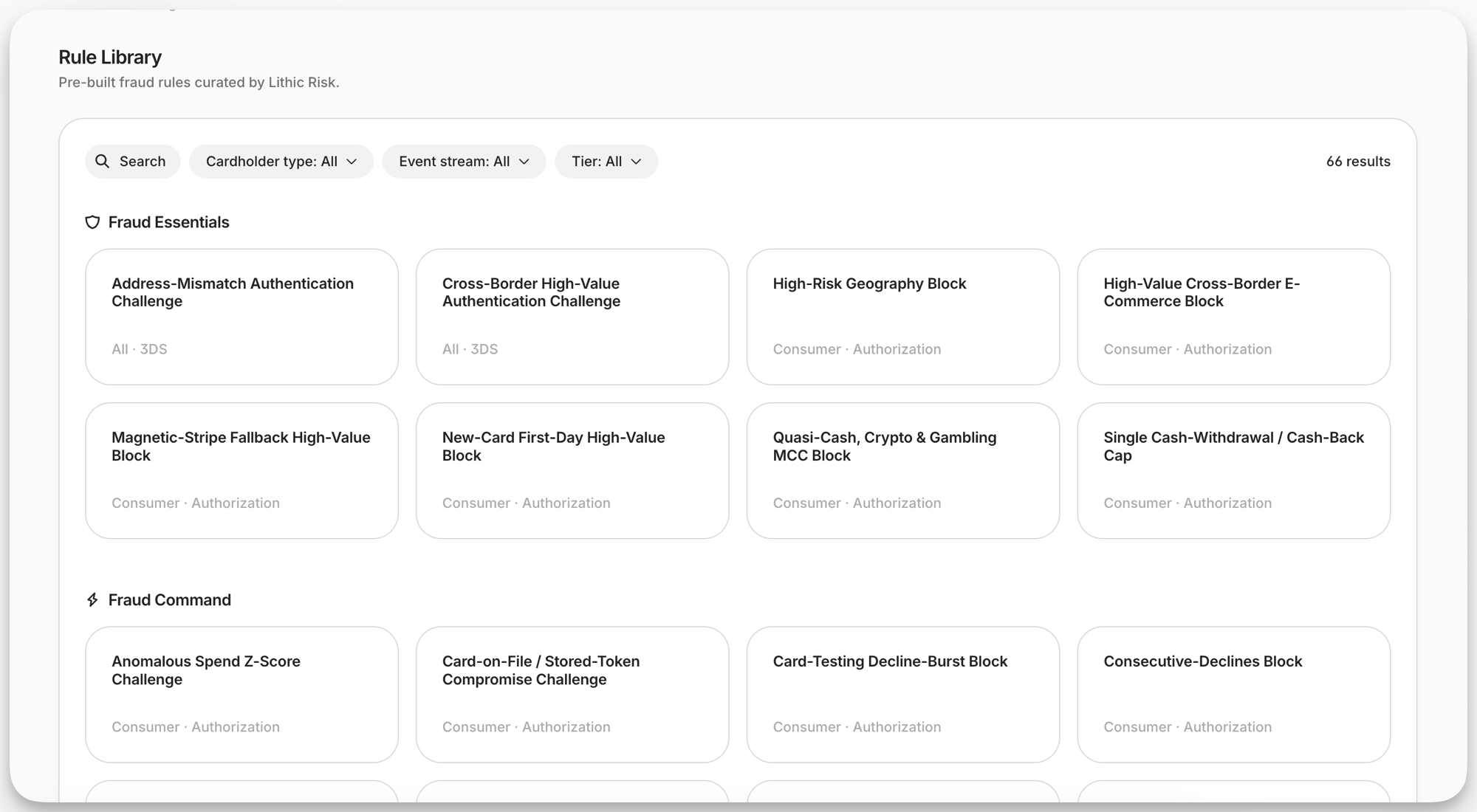
The Rule Library is a curated set of pre-built Authorization Rules, built and maintained by Lithic's Risk team. Each entry identifies the fraud scenario it targets, describes the logic it applies, and carries a default configuration that can be copied onto a program in a few clicks. The library is available in the Lithic Dashboard under Authorization Rules.
The library addresses the cold start problem in fraud strategy: determining which fraud patterns are relevant to a program, what thresholds to set, and whether to decline or challenge. Programs migrating from a legacy processor that managed fraud rules on their behalf get an equivalent starting point, and programs launching for the first time get a reference to accelerate the buildout. In both cases the starting point reflects patterns Lithic's Risk team has observed across hundreds of card programs.
The Risk team adds and revises rules as new fraud patterns emerge, so the contents of the library change over time.
Finding a Rule
Rules are grouped into Fraud Essentials and Fraud Command sections, and each tile shows the rule's cardholder type and event stream. Search by rule name and filter by cardholder type, event stream, or tier to narrow the list. The library is organized along those three axes:
- Tier indicates whether a program can run the rule today. Without the Fraud Command add-on, Fraud Command rules remain visible and readable but cannot be added to a program. See Feature Tiers for what each tier includes
- Cardholder type is
Consumer(neobank, prepaid, gift, credit, and teen or family programs),Commercial(corporate card, expense, fleet, B2B virtual card, and accounts payable programs), orAll. The label reflects where the Risk team most often observes the pattern; either kind of program can add either kind of rule - Event stream extends beyond card authorizations. The filter lists the streams currently represented in the library, which can include
AUTHORIZATION,THREE_DS_AUTHENTICATION,TOKENIZATION, and the ACH receipt streams
Some rules carry prerequisites beyond tier. A CHALLENGE rule on the 3DS authentication stream requires 3DS enrollment and a configured challenge orchestration model, and an ACH RETURN rule requires the program to be approved for the NACHA return code it uses.
What the Library Covers
The library targets the fraud patterns that can be intercepted at authorization time:
- Third-party fraud, where an attacker uses the card and the cardholder is the victim: account takeover, counterfeit and cloned cards, card-not-present fraud with a stolen PAN, card testing and enumeration, wallet provisioning fraud, and contactless relay attacks. Authorization rules are strongest against this category
- Second-party fraud, where the cardholder lets someone else use the card and later repudiates the spend. Rules detect the dispersion and impossible-travel patterns this produces, and can require a challenge that binds the genuine cardholder to the transaction
- First-party fraud, where the account holder is the bad actor: credit bust-out, manufactured spend, out-of-policy cash extraction, and employee misuse on commercial programs. Rules cap exposure with velocity and spend limits and enforce spend policy
Reviewing and Adding a Rule
Selecting a rule opens a read-only view of what the Risk team built:
- Its tier, cardholder type, and event stream
- A description of the scenario the rule targets and how its logic catches it
- Its default configuration, shown as conditions or velocity parameters, or as TypeScript source for a custom code rule
The "Add to Program" button creates the rule at the program level, with no active version and a draft running in shadow mode. For a custom code rule the TypeScript compiles first, so the draft is briefly PENDING. Once the rule is created, the Dashboard opens its page in Authorization Rules.
Adding a rule requires the same permission as creating one by hand. The library is available in sandbox as well as production, so the full flow can be exercised against test traffic first.
The result is an ordinary Authorization Rule owned by the program, managed through the Dashboard or the Auth Rules API like any other. It is a point-in-time copy: later revisions to the library entry do not reach it, and edits to the program's copy never affect the library. To narrow its scope, edit the rule after adding it. See Scoping a Rule.
Calibrating a Rule Before Promotion
Library rules arrive uncalibrated. Every threshold, MCC list, country list, and time window is a starting point drawn from cross-program patterns, and each program's traffic differs. Calibration is the program's responsibility. Promoting a library rule without first measuring it against the program's own authorization stream risks over-declining legitimate spend, under-protecting against the pattern the rule targets, or both.
Thresholds do not transfer between programs. A cross-border amount ceiling that is conservative for a domestic consumer debit program will decline routine spend on a program whose cardholders travel. A card-testing velocity cap sized for a neobank will block legitimate bursts on a B2B program that issues a single-use card per invoice. Expect to adjust amounts, velocity caps and windows, category and country lists, and scope before promoting.
Once the rule is on the program:
- Backtest the draft, on programs with Fraud Command, to size thresholds against historical transactions and return an impact estimate in minutes
- Let the draft run in shadow mode across a representative period, including the weekends, paydays, and monthly cycles relevant to the program's cardholders. The draft records the action it would have taken while every authorization is decided as if the rule were not present
- Review the performance report for daily counts of what the draft would have done. Statistics recalculate once every 24 hours after the UTC day closes, so the first full day of data arrives the following day. To confirm the rule matched specific transactions, check rule results, which populate in real time
- Tune the draft and continue observing. Edits take effect immediately and feed the next reporting period
- Promote the draft, then continue monitoring and re-tune as the program grows and fraud patterns change
Limitations
- Library rules are starting points and do not replace a fraud risk assessment specific to the program
- The library is Dashboard-only. There is no public API for listing or retrieving library entries, though rules added from the library have full API support
- Block rules such as merchant category or country restrictions must be consistent with the program's cardholder agreement and card network policies
Related Pages
- Feature Tiers: what Fraud Essentials and Fraud Command each include
- Authorization Rule Lifecycle: draft, promote, disable, and delete rules
- Analytics and Observability: shadow mode, performance reports, and rule results
- Backtesting Authorization Rules: simulate a rule against historical transactions
For questions about a specific library rule or how to calibrate it, contact your Lithic account team or use the HELP button in the Lithic Dashboard.
Updated 3 months ago